Posts

Last Task: Webquest

Image
 Hello my dear followers! I hope you are all having a great day. Me? I am a bit sad today because this is my last task for my Material Desing In Language Teaching course. Looking back now, it seems like a very short period in this course. It all started with our professor Gökçe KURT TİFTİK's "Hello", and here I am posting my final post. In this last task, I work with my dearest group friends, Ayşe TOY and Hazal ULUDAĞ . Finally we created our "Webquest". Webquest is a lesson plan format in which learners get the information they need to investigate independently to prepare a task. A webquest can be created by different programs or tools and I, with my group preferred using  QuestGarden . The process was easier compared to the previous task, to be honest. :)) I worked collaboratively with my group, and it was done without much effort. I think it was because of our experience in this course. We prepared many materials not only in this course but also in Education...

It Can't Be Real!! Actually, it is.

Image
Hello my dear followers! I am here presenting you something that I've never tried before. Augmented Reality Yaaaay! This time our task is creating Augmented Reality task. For this mission, we used UniteAR (after trying hundreds of apps, and searching for hundreds of ways)   UnıteAR is an application which helps you create your own Augmented Reality image. The process is very simple, upload an image, and you can add videos, 360 panorama image, audio or even link. However, there is a free trial days and then you have to pay for it. ( Sad ) Yes, I worked with my classmates, my dear friends Ayşe TOY and Hazal ULUDAĞ in this task. We created a task for students to explore Rome, Italy. Of all the beautfiful places, landmarks and foods, we chose 1 place; Capitoline Museums, 4 landmarks; St. Peter's Basilica, Colosseum, Trevi fountain, Pantheon, and 2 foods; Suppli Al Telefono, and Pizza. ( the last one is hard to guess :)) We are deeply sorry for not choosing all of them :(  Down be...

Teaching Grammar With Flipped Videos

Image
Hello my dear followers, The second flipped video that you have been waiting impatiently is here now. Let me present you my second filpped classroom approach project; Flipped Grammar Teaching Video. (yaaaaay!) As in our previous flipped video, we prepared this video with th help of Animaker . The process is same here again, choose a unit from the coursebook, choose a grammar topic to teach aaand, start teaching it :D With my friends Rabia TUĞLU and Beyza USLU  We share the labor, and each of us did our part; added sentences, examples, images, voices, music. This time it was easier because we get used to using animaker, and thankfully it took less time. You can see our video right below. We were supposed to prepare a quiz for this video and guess which tools this lazy group used again? Wordwall , not surprised! Hey come check this classy quiz. Here, click this. This was my favourite task in this lesson actually. Yes, it did take much more time and effort than we imagined but with ...

Flipped Vocabulary Teaching Videos

Image
 Hello my dear followers. Today I come up with another topic for you, yes, flipped classroom. In my Material Design course, we work on different tools with my friends as you know, and here I am to share my experience with you. Flipped classroom in brief, is an approach which carry class lecturing to home, thus leaves enough space to class work. We learned and experienced this useful approach by preparing our own flipped vocabulary teaching classroom. Let me present you my teammates, Beyza USLU  aaaand Rabia TUĞLU . We started with choosing a grade, and topic to choose. (Easiest part, I know :) ) Then we chose a website to create our flipped video, and special thanks to ' Animaker ' for that. It is such useful, detailed, and fun tool to create any video. C'mon, go give it a try, you will love it. (End of the product placement *.*)  After editing pictures and audios (believe me when I say this, the hardest part of the task. First, there are lots of audio we recorded and pu...

Welcome Back!

Image
 Hello my dear folowers. I thought I made you wait too much, and you probably miss me so I decided to come back for you. Real education and technology lovers, yes this is you :) Joking. I mean the missing part, though. :( This term I will be preparing things under the name of my new lesson in Marmara University, Material design (*gliter*). Now that I'm back let's talk about something new today, at least for me :) Task Based Corpus Material. What is it? Well, corpus, as you know, is the huge collection of words that forms a language, and it provides the data for language learners. In corpus based material design the aim is to help students raise their language awareness by practising data-driven learning. You can find many webtools for this purpose, some of them are, Lextutor , Skell , English Corpora  or what I choose for my material Wordhippo .   Look how cute it is. I prepared it with my dear friend Bilge YENGEL .  We did our best to create this material using Canv...

Time to Say Goodbye

HELLO DEAR FOLLOWERS I am sorry to say that this is my last post. :( We did many things through the term. In my Educational Technologies course my teacher Gökçe KURT TİFTİK taught us many things and helped us a lot. ( Thanks dear teacher :) ) I learned what is technology, what is learning and how to combine these two with each other. I learned how to use web tools such as Canva, Ingographic, Wikipage and many for educational purpose. (Most of them arouse my curiosity by the way.) You were here when I was going through this process. You are the biggest witnesses.  I did my best I think. I tried to learn and enjoy while practising what I learned. Though it might be hard sometimes I still enjoyed this term. Also I believe in this century technology will be in favor of us, we, future teachers. I know that I will be eager to use technology in my classes because I saw its advantages. Thank you all. Hope to see you in my future educational blogs. .ZeyUs.

Who Said Infographic?!

Image
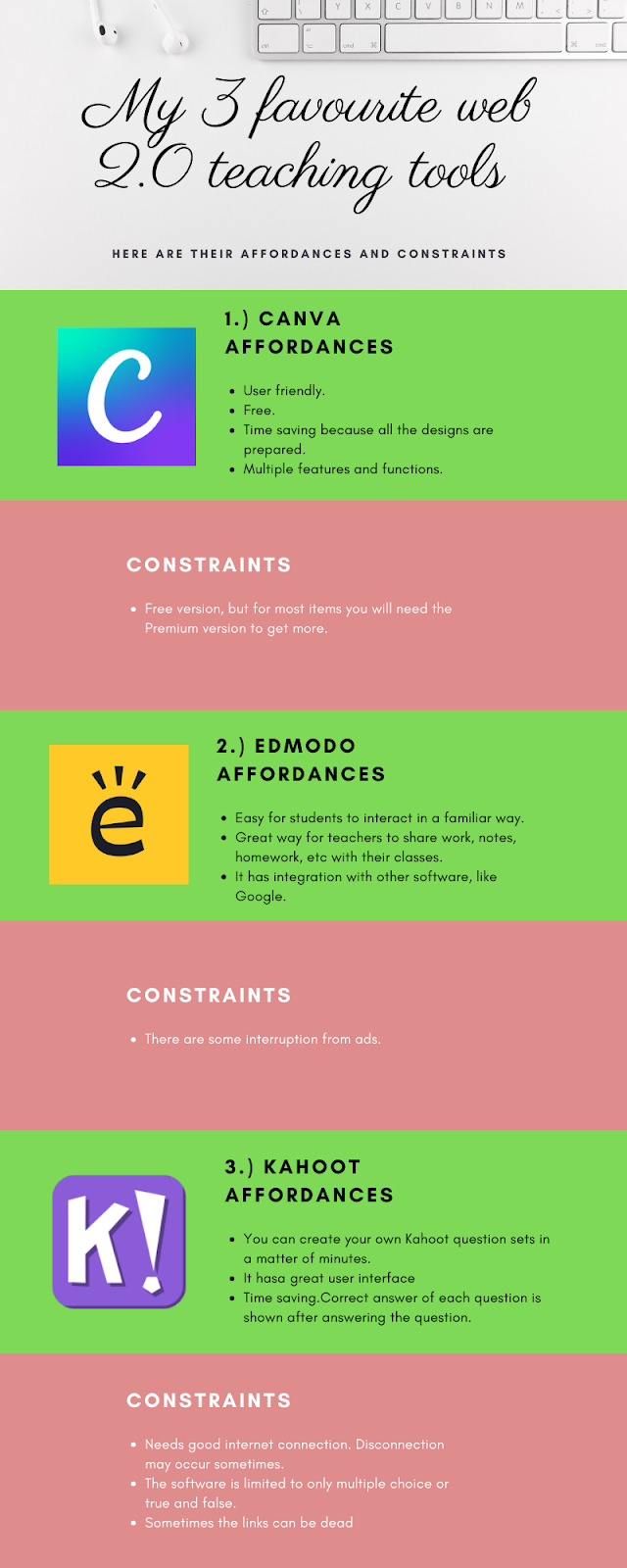
HELLO DEAR FOLLOWERS! Today I am here with another task: Infographic :) I prepared an infographic to show you my three favourite 2.0 webtools. Let's start with Canva. Canva is an online tool that allows users to choose from hundreds of professionally designed layouts or create their own designs from scratch, for use in presentations, posters, infographics, social media, business cards, and much more. Edmodo is an    educational learning network in which teachers can  create and manage an online classroom community and  students can connect and work with their classmates or teachers anywhere and anytime. Kahoot  is a game-based learning platform that makes it easy to create, share and play learning games or trivia quizzes in minutes. In my infographic, I give some brief information about these three web 2.0 tools. You can see their affordances and constraints below. Hope you like my infographic.  .ZeyUs. Sources:  getapp.com ...

Made My Own Film Poster!

Image
HELLO DEAR FOLLOWERS1 Today I'm here to present you another thing that I made. I made a movie poster! Yay! Here it is. Seems cool right? For my Educational Technologies course (you know) I used some specific tools to create podcast, film review website, padlet, digital story etc. What I create today is a movie poster. This poster is the illustration of the Turkish book 'Oğullar ve Rencide Ruhlar' written by Alper CANIGÜZ. I used Canva  while prepearing this poster. Canva is a designing web tool in which you can create blog graphic, album cover, instagram post, invitation and many things. Besides it is free. There are many web tools for designing but I think, Canva is the best among them.  How about trying it to design a movie poster better than mine? C'mon! .ZeyUs.

Digital Way of Storytelling

Image
HELLO DEAR FOLLOWERS! Today we are going to talk about Digital Storytelling. Let's start. Digital Storytelling means creating a digital story by using tools such as video, audio, pictures and text. There are some key elements if you are making digital stories; Point of view. What is the main point of the story? A dramatic question. A key question that keeps the viewer's attention. Your gifted voice. (some of us are unlucky about it ;) ) Personalizing the story to help the audience understand the context. Impact of the soundtrack.  Pacing. The rhythm of the story. We, in our Educational Technologies course, created our own digital story as a project with my classmates  Gizem YILDIRIM and Hazal ULUDAĞ . We use Pixton Storyboard Maker website for this project.We made editing, voice recording together and found proper sound effects. It was a bit challenging but highly enjoyable :) We named our digital story as ' DAY DREAM '. It is a story of a d...

Do You Know Padlet?

Image
HELLO DEAR FOLLOWERS!  Here I am with my Educational Technology course homework: Padlet. (Yay!) Padlet is a website in which you can create online bulletin board and use it to share some information about any topic. You can simply write the informations or you can add links, images, videos and files to make your board more professional. For this Padlet homework we came together with my friends; Ayşe Ceren ÖZTÜRK, Hande ÖZTÜRK and Şebnem SÖNMEZ . We chose our topic (Violence Against Women In Turkey) and started working. Finally we created the padlet. You can find our board below. Don't forget to comment on it. It seems that's all for now :) Thanks for reading. .ZeyUs.

It's Time To Fight

Image
HELLO MY DEAR FOLLOWERS Today I am  going to talk about film reviewing. In Educational Technologies class our teacher , Gökçe KURT , wanted us to review a film via wikipage and with a partner. We learned what is wiki and how to prepare a wiki page on the Internet. So I chose Cansu (TURHAN)  (actually she chose me) giggling and we chose a film. The film is Fight Club.  Then we started. Here is the wikipage link.                                                       Blog link of my partner you can click here . It's a really remarkable blog , you should follow it.                                                        .ZeyUs.

Let's Podcasting

Image
HELLO DEAR FOLLOWERS! Today I am going to talk about podcasting.                                       In my Educational Technology course I was assigned to do a podcast.So I am here with my podcast. Podcast is a digital audio file made available on the Internet for downloading to a computer or mobile device,typically available as a series* in brief.One can listen podcast or create one to share his/her ideas. I'm not fond of podcasting actually.My podcast case started with the assignment.Then I made small research.I chose my topic  (is changing the world,you can see my podcast below.) prepared a small text about it and started recording.                                                                 My podcast ...

RSS - My Followings

Image
HELLO DEAR FOLLOWERS! Today we're going to talk about RSS.                 There are blogs for education,information or recreation purposes.We follow them according to our needs or interests.Me for instance,as a blogger I know that I should be aware of other blogs and keep myself updated to be creative.To do this I follow,read and enjoy some blogs. However,since there are lots of blogs to keep up with and so many posts to read,I may have some difficulties. But don't worry,the RSS  software helps a lot in this process. RSS (Really Simple Syndication) is a delivery format for letting us know the regularly changing web contents.This software helps us to catch feeds from various sites that we follow and shows them to us to read and use.Plus it’s time saving! Here are my followings. Spanish is my special interest and the Spanish blog above helps me to comprehend the language.* information time * Now here is an ed...

Learning In the 21st Century

Image
HELLO MY DEAR FOLLOWERS ! In this post we're going to talk about 21st Century Learning.                                                                              When we think about learning process we consider the past principle of the old education system called conventional learning . In this learning the teacher is on the center,grammar is the most important thing,the teacher is dependant on the coursebook and all that matters is the test. However,in the modern learning t ype called 21st century learning these are opposite;the student is on the center,student's knowledge about how to use the information is the most important thing,the coursebook is used as a tool and the foremost thing is assessment of the capabilities of the student.By this means,in the 21st century lear...

HELLO EVERYONE

HELLO TO ALL! This is Zeynep and I newly opened a blog and this is going to be my first post! * some excited sounds* OK.  * serious*         I am an ELT student at MARMARA UNIVERSİTY and I am going to share some information , advises , comments and homeworks *of course* about my  Educational Technologies  course in this blog. I take the course from the teacher Gökçe KURT . This blog will be colorful , complex or even simple sometimes. Anyway the time will show us. *hoping for the colorful one* Hope you enjoy my blog! Thanks for reading. Love... .ZeyUs.